· Dissemination · 3 min read
Wayfinder: AI-Assisted Rubric Authoring in MAPLES
Watch Minhan Park and Licheng Yi demonstrate Wayfinder: create a structured rubric from a short description, enhance it with accept/reject suggestions, transform it for a new scenario, and continue in chat.
Structured rubrics are the backbone of reliable OSCE grading — and writing them well is slow. Wayfinder is the agentic assistant inside MAPLES that helps educators draft and refine executable rubrics while keeping every accepted change under human control.
In this walkthrough, Jamieson Lab research interns Minhan Park and Licheng Yi show the rubric-authoring path end to end: natural-language create, inspect, enhance with visible reasoning, accept or reject suggestions, transform an existing rubric for a new scenario, and continue the workflow in Wayfinder chat.
The demo uses a domain-neutral synthetic scenario (perfume making, then candle making) so the workflow is easy to follow without clinical or learner data.
Start From a Short Description
Wayfinder and the MAPLES Rubrics UI turn a brief task description into a structured rubric: sections, items, modalities, and scoring levels ready for review. Educators do not begin from a blank spreadsheet.
Enhance With Visible Reasoning
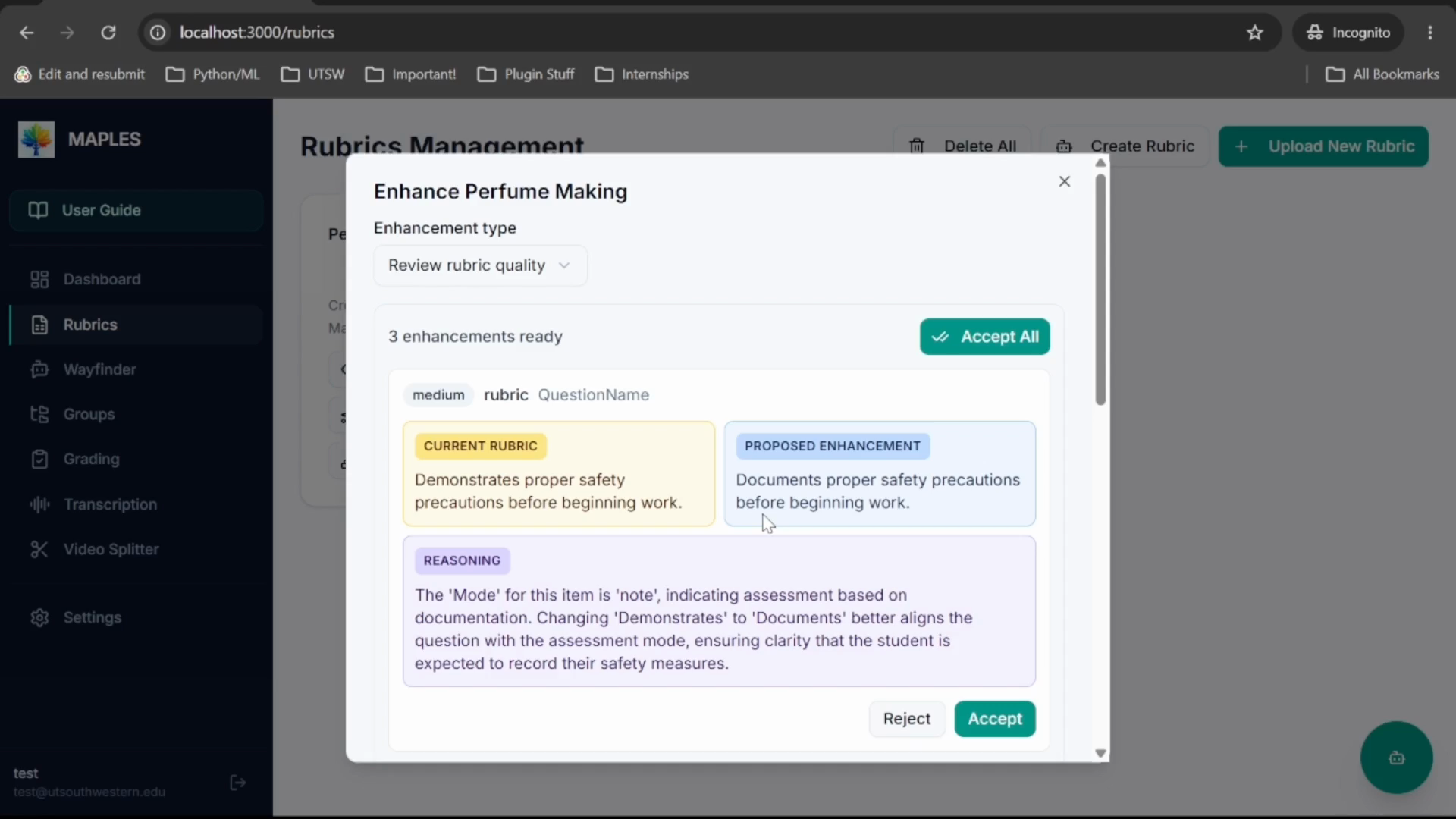
Enhancement is not a black-box rewrite. For each suggestion, the interface shows the current wording, the proposed wording, and the agent’s reasoning. Reviewers accept or reject item by item — or accept all when the changes hold up.
That legibility is the product point: AI drafts; people decide.
Transform for a New Scenario
Once a solid rubric exists, MAPLES can transform it for a related task — in the demo, from perfume making to candle making — preserving structure while adapting content. That supports reuse across stations, training modules, and partner-site variants without starting over.
Continue in Wayfinder Chat
Wayfinder chat sits beside the form-driven UI. In the demo, a simple request lists available rubrics and invites the next step — inspect details, refine further, or move toward grading. The same assistant surface is designed to hand generated artifacts into the broader MAPLES workflow.
What the Walkthrough Shows
- Creating a structured rubric from a short natural-language description
- Inspecting generated sections, items, and scoring levels
- Running AI enhancement with current vs proposed wording and reasoning
- Accepting or rejecting suggestions under human control
- Transforming a rubric for a new but related scenario
- Continuing the workflow in Wayfinder chat
Why It Matters for UT-REAL
Partner sites need more than a grading model. They need a practical path from local assessment design to executable rubrics, then into AI-assisted scoring and faculty review.
Wayfinder addresses the front of that pipeline: faster rubric authoring with inspectable AI suggestions. Combined with the MAPLES grading and faculty-review walkthrough, it shows how UT-REAL’s stack supports both designing assessments and running them with evidence and human oversight.